Desktop view only
Flash API Document
The Flash Partner API provides access to Flash’s products and services. We offer integrations for both Direct Merchants and Payment Service Providers. If you have any questions or queries, please feel free to contact us at integrations@flash.co.za
1. Authentication
All requests are protected by API bearer authentication using OAuth 2.0 access tokens. An access token is issued by the OAuth 2.0 server from the Access Token URL and is valid for 3600 seconds (60 minutes):
Environment | Token URL |
Staging | https://api-flashswitch-sandbox.flash-group.com/token |
Production | https://api.flashswitch.flash-group.com/token |
1.1 Generating an Access Token
Flash Integrations will have provided your organisation with an API Key for both Sandbox and/or Production. To obtain an access token, run the following command (where Authorization: Basic is followed by the API Key provided by Flash Integrations) and the response will include the access token as well as the token’s validity period in seconds:
Request Example | Response Example |
curl -k -d "grant_type=client_credentials" | { |
When testing in a Sandbox environment, make sure to use your Sandbox token. Once you’re ready to send live transactions, you can switch to the Production token. If authorisation errors occur due to an expired token or you feel your token may have been compromised, please generate a new token.
1.2 Authenticating an API call
To send API requests through the Flash Partner API, the access token must be included with every API call. To authenticate an API request, the following parameters must be sent:
Request Parameters
Parameter | Value |
Location | Endpoint |
Accept | application/json |
Content-Type | application/json |
Authorization | Bearer Access Token |
Data |
Example Request and Response
Request Example | Response Example |
curl --location 'https://api.flashswitch.flash-group.com/aggregation/4.0/1voucher/purchase' \ |
2. Error Handling
2.1 Response Codes
Successful Response
The API should return an HTTP status code 200 for all successful requests. The response body should be a JSON object containing a key responseCode with a value of 0. This indicates a successful operation. Additional data relevant to the request may be included in the response JSON object. Examples of successful responses can be found here.
PLEASE NOTE: JSON is a loosely structured protocol; whilst it is Flash's intention to conform as strictly as possible to the API data specifications as written, certain extra fields might be present in API response payloads that are not documented. Please configure your parser to be permissive when dealing with responses, and simply ignore any values that do not match the documented API structures.
Unsuccessful Response
If an API call is unsuccessful, it should still return an appropriate HTTP status code (non-200) to indicate the failure. The response JSON object should contain an error code and a descriptive error message to help identify the issue.
In some cases, an API call may result in an unsuccessful response (responseCode is not 0) despite an HTTP status code 200. This can occur due to errors from intermediary systems.
Example of an unsuccessful response:
Response Example |
{ |
For a comprehensive list of possible error codes and their corresponding descriptions, please refer to Response Codes.
It is essential to handle both successful and unsuccessful responses appropriately in your application to ensure robust error handling and user experience.
2.2 Idempotent Requests
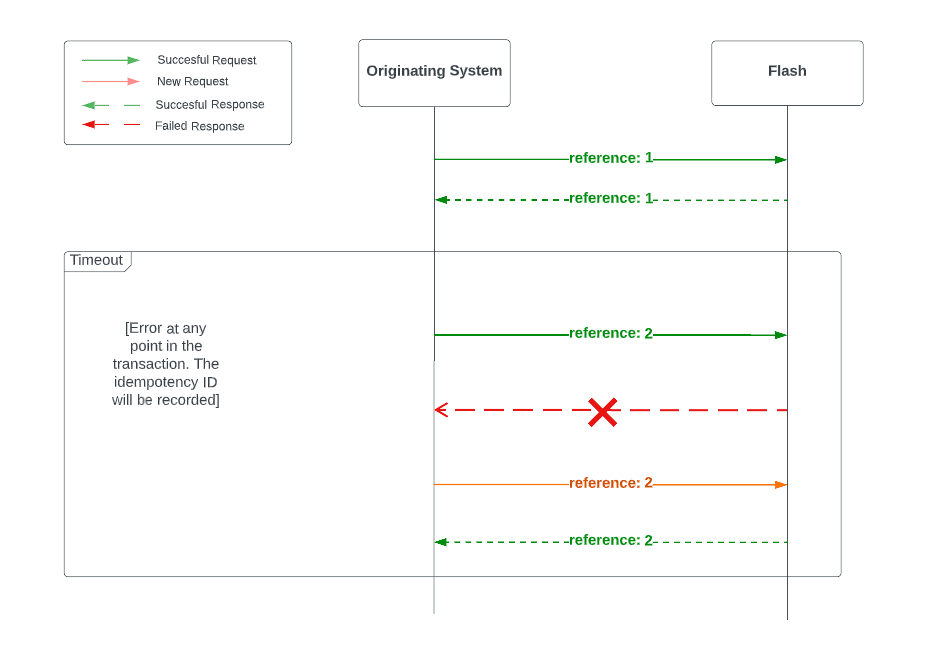
The endpoints in this API are designed with idempotency, which means that if a subsequent request is sent with the same reference as the initial request, it will return the response of the initial request. This is particularly useful in cases of a broken connection or timeout during the response process. To make use of the idempotency, subsequent requests or retries must include the same reference. The figure below shows an example of the flow of an idempotent request.
2.3 Reversals
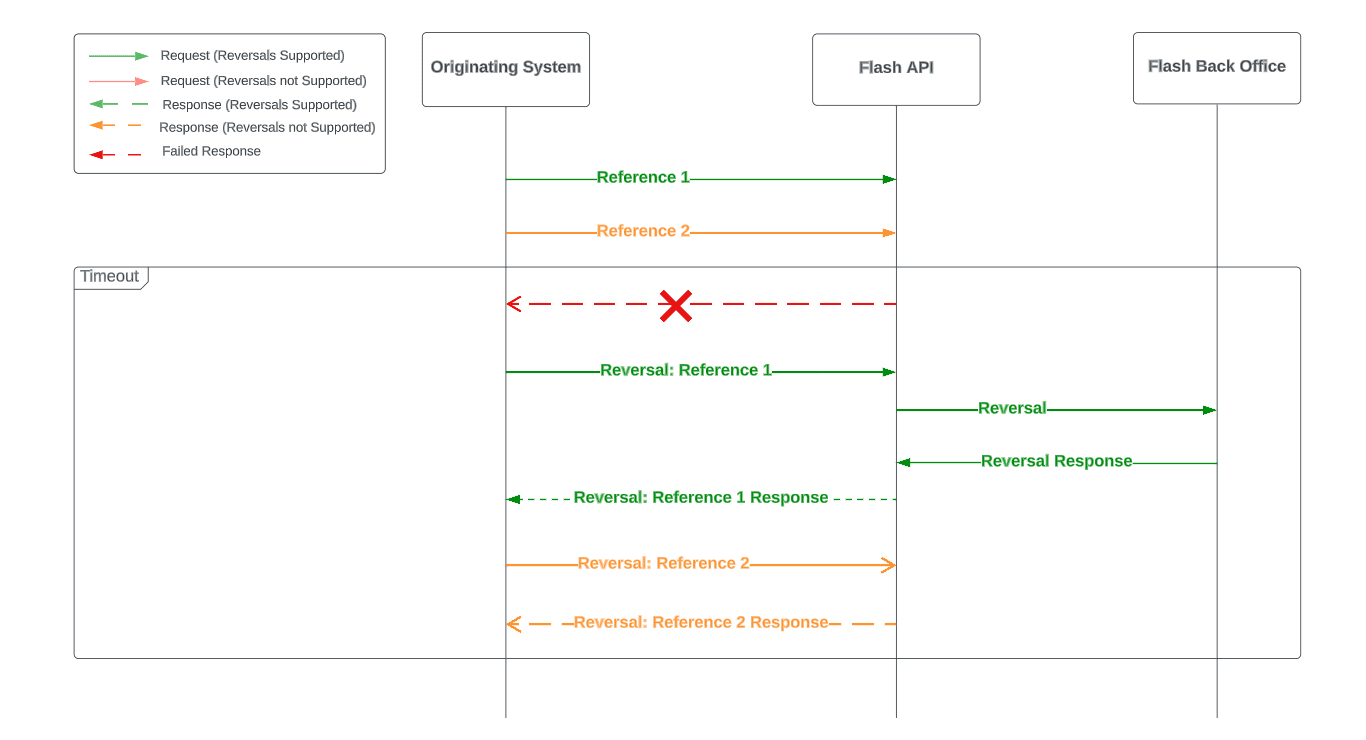
Reversals are available on supported products where applicable. The reversal endpoint allows the complete reversal of a transaction to its original state. This functionality is particularly useful for Point of Sale (POS) applications, especially in cases where there is a broken connection or timeout during the response process.
When a reversal is successfully issued on a product, a new transaction is not recorded in the transaction file and all charges related to the original transaction are reversed, setting the original transaction's status to 'Reversed.'
Reversals can be performed only on the following Products: 1Voucher, Cash Out PIN, Eezi Voucher. Where reversals are not supported for a product, a specific error message will be returned.
3. API Reference
3.1 Base URL
The base URLs for this API are as follows:
Environment | Base URL |
Sandbox | https://api-flashswitch-sandbox.flash-group.com |
Production | https://api.flashswitch.flash-group.com |
3.2 Accounts
The Accounts resource group provides non-product specific queries and actions relating an account. The following endpoints are available for Accounts:
List Products
HTTP Method | Endpoint |
GET | Base URL/aggregation/4.0/accounts/{accountNumber}/products |
Example Request and Response
For a request and response example, please refer to the List Products request and response.
Lookup a Product by Product Code
HTTP Method | Endpoint |
GET | Base URL/aggregation/4.0/accounts/{accountNumber}/products/{productCode} |
Example Request and Response
For a request and response example, please refer to the Lookup a Product by Product Code request and response.
Lookup Products by Product Group
This applies to the following product groups: 1Voucher, Cash Out PIN, Cellular, Eezi Vouchers, Flash Token, Gift Vouchers, Prepaid Utilities and Flash Pay:
HTTP Method | Endpoint |
GET | Base URL/aggregation/4.0/accounts/{accountNumber}/products/{productGroup} |
Example Request and Response
For a request and response example, please refer to the Lookup Products by Product Group request and response.
3.3 1Voucher
The 1Voucher product group provides the ability to access 1Voucher services, this includes purchasing, disbursing, redeeming and refunding a redemption of a 1Voucher. The following endpoints are available for 1Voucher:
Purchase a 1Voucher
Note: this request will only be available for purchasing a 1Voucher using payment methods.
HTTP Method | Endpoint |
POST | Base URL/aggregation/4.0/1voucher/purchase |
Request Parameters
Parameter | Data Type | Required | Format | Description |
Reference | String | Yes | Only -,.,= and alphanumeric characters allowed. | Client-defined reference number Must be unique for all transactions. |
AccountNumber | String | Yes | Alphanumeric characters allowed. | The account number of the Merchant. |
Amount | Integer | Yes | Cents. | The value of the 1Voucher being purchased. The currency is “ZAR” and the value is in cents. |
StoreId | String | No | Alphanumeric characters allowed. | The store where the 1Voucher was purchased. For Merchants with Digital channels, this will be a single value. For Merchants with Physical Store locations, each individual storeId will need to be sent in the request. |
TerminalId | String | No | Alphanumeric characters allowed. | The till in the store where the 1Voucher was purchased. For Merchants with Digital channels, this will be a single value. For Merchants with Physical store locations, each individual terminalId will need to be sent in the request. |
PaymentMethod | String | No | Alphanumeric characters allowed. | The paymentMethod used to make the 1Voucher purchase. |
Metadata | Set of Key Value Pairs | No | Up to 9 properties. Property name up to 10 characters. Property value up to 43 characters. | Set of key-value pairs. This can be useful for storing additional information about the transaction in a structured format. e.g. key-value pair: storeID and value could be used to identify Voucher redemptions at a store level. |
Example Request and Response
For a request and response example, please refer to the Purchase a 1Voucher request and response.
Disburse a 1Voucher
Note: this request will only be available for disbursing 1Vouchers from an online balance.
HTTP Method | Endpoint |
POST | Base URL/aggregation/4.0/1voucher/disburse |
Request Parameters
Parameter | Data Type | Required | Format | Description |
Reference | String | Yes | Only -,.,= and alphanumeric characters allowed. | Client-defined reference number Must be unique for all transactions. |
AccountNumber | String | Yes | Alphanumeric characters allowed. | The account number of the Merchant. |
Amount | Integer | Yes | Cents. | The value of the 1Voucher being disbursed. The currency is “ZAR” and the value is in cents. |
StoreId | String | No | Alphanumeric characters allowed. | The store where the 1Voucher was disbursed. For Merchants with Digital channels, this will be a single value. For Merchants with Physical Store locations, each individual storeId will need to be sent in the request. |
TerminalId | String | No | Alphanumeric characters allowed. | The till in the store where the 1Voucher was disbursed. For Merchants with Digital channels, this will be a single value. For Merchants with Physical store locations, each individual terminalId will need to be sent in the request. |
Metadata | Set of Key Value Pairs | No | Up to 9 properties. Property name up to 10 characters. Property value up to 43 characters. | Set of key-value pairs. This can be useful for storing additional information about the transaction in a structured format. e.g. key-value pair: storeID and value could be used to identify Voucher redemptions at a store level. |
Example Request and Response
For a request and response example, please refer to the Disburse a 1Voucher request and response.
Redeem a 1Voucher
HTTP Method | Endpoint |
POST | Base URL/aggregation/4.0/1voucher/redeem |
Request Parameters
Parameter | Data Type | Required | Format | Description |
Reference | String | Yes | Only -,.,= and alphanumeric characters allowed. | Client-defined reference number Must be unique for all transactions. |
AccountNumber | String | Yes | Alphanumeric characters allowed. | The account number of the Merchant. |
Pin | String | Yes | 16 digits | The pin of the voucher to be redeemed |
Amount | Integer | Yes | Cents. | The value of the 1Voucher being redeemed. The currency is “ZAR” and the value is in cents. "0" value will redeem the full value of the voucher. |
StoreId | String | No | Alphanumeric characters allowed. | The store where the 1Voucher was redeemed. For Merchants with Digital channels, this will be a single value. For Merchants with Physical Store locations, each individual storeId will need to be sent in the request. |
TerminalId | String | No | Alphanumeric characters allowed. | The till in the store where the 1Voucher was redeemed. For Merchants with Digital channels, this will be a single value. For Merchants with Physical store locations, each individual terminalId will need to be sent in the request. |
mobileNumber | String | No | 11 Digits (27 Country Code with no leading 0) | sent in the request. For a Partial Redemption/Change Voucher where the redeemed amount is less than the Voucher value, the new Voucher will be sent as an SMS to the mobileNumber provided. If no mobileNumber is supplied, the Voucher will |
Metadata | Set of Key Value Pairs | No | Up to 9 properties. Property name up to 10 characters. Property value up to 43 characters. | Set of key-value pairs. This can be useful for storing additional information about the transaction in a structured format. e.g. key-value pair: storeID and value could be used to identify Voucher redemptions at a store level. |
Example Request and Response
For a request and response example, please refer to the Redeem a 1Voucher request and response.
Refund a 1Voucher Redemption
Note: This request does not reference the original redemption transaction. Instead, a new voucher is provided for the full requested amount and the amount will be deducted from the redemption balance.
HTTP Method | Endpoint |
POST | Base URL/aggregation/4.0/1voucher/refund |
Request Parameters
Parameter | Data Type | Required | Format | Description |
Reference | String | Yes | Only -,.,= and alphanumeric characters allowed. | Client-defined reference number Must be unique for all transactions. |
AccountNumber | String | Yes | Alphanumeric characters allowed. | The account number of the Merchant. |
Amount | Integer | Yes | Cents. | The value of the 1Voucher being refunded. The currency is “ZAR” and the value is in cents. |
StoreId | String | No | Alphanumeric characters allowed. | The store where the 1Voucher was refunded. For Merchants with Digital channels, this will be a single value. For Merchants with Physical Store locations, each individual storeId will need to be sent in the request. |
TerminalId | String | No | Alphanumeric characters allowed. | The till in the store where the 1Voucher was refunded. For Merchants with Digital channels, this will be a single value. For Merchants with Physical store locations, each individual terminalId will need to be sent in the request. |
MobileNumber | String | No | 11 Digits (27 Country Code with no leading 0). | For a Refund, the new Voucher will be sent as an SMS to the mobileNumber provided. If no mobileNumber is supplied, the Voucher will be returned in the response. |
Metadata | Set of Key Value Pairs | No | Up to 9 properties. Property name up to 10 characters. Property value up to 43 characters. | Set of key-value pairs. This can be useful for storing additional information about the transaction in a structured format. e.g. key-value pair: storeID and value could be used to identify Voucher redemptions at a store level. |
Example Request and Response
For a request and response example, please refer to the Refund a 1Voucher Redemption request and response.
Reverse a 1Voucher Transaction
Note: SMS is not supported for change voucher and refund transactions when a Merchant has been configured for Reversals. 1Vouchers that have been purchased and redeemed cannot be reversed.
HTTP Method | Endpoint |
POST | Base URL/aggregation/4.0/1voucher/reverse |
Parameter | Data Type | Required | Format | Description |
Reference | String | Yes | Only -,.,= and alphanumeric characters allowed. | Client-defined reference number Must be unique for all transactions. |
OriginalReference | String | Yes | Only -,.,= and alphanumeric characters allowed. | Client-defined reference number of the original transaction that is being reversed. |
AccountNumber | String | Yes | Alphanumeric characters allowed. | The account number of the Merchant. |
Example Request and Response
For a request and response example, please refer to the Reverse a 1Voucher Transaction request and response
3.4 Gift Vouchers
The Gift Vouchers product group provides the ability to purchase Gift Voucher products. The following endpoints are available for Gift Vouchers:
Purchase a Gift Voucher
HTTP Method | Endpoint |
POST | Base URL/aggregation/4.0/gift-voucher/purchase |
Request Parameters
Parameter | Data Type | Required | Format | Description |
Reference | String | Yes | Only -,.,= and alphanumeric characters allowed. | Client-defined reference number Must be unique for all transactions. |
AccountNumber | String | Yes | Alphanumeric characters allowed. | The account number of the Merchant. |
Amount | Integer | Yes | Cents. | The value of the Gift Voucher being purchased. The currency is “ZAR” and the value is in cents. |
ProductCode | Integer | Yes | Positive Integers allowed. | A Flash assigned unique product identifier that identifies a specific Gift Voucher product being purchased. |
StoreId | String | Yes | Alphanumeric characters allowed. | The store where the Gift Voucher was purchased. For Merchants with Digital channels, this will be a single value. For Merchants with Physical Store locations, each individual storeId will need to be sent in the request. |
TerminalId | String | Yes | Alphanumeric characters allowed. | The till in the store where the Gift Voucher was purchased. For Merchants with Digital channels, this will be a single value. For Merchants with Physical store locations, each individual terminalId will need to be sent in the request. |
Barcode | String | No | Positive Integers allowed. | A Flash assigned EAN that identifies a specific Gift Voucher product being purchased. A barcode can be provided in place of the product code. If a barcode is provided, the product code cannot be included and an error will be returned. |
Example Request and Response
For a request and response example, please refer to the Purchase a Gift Voucher request and response.
3.5 Cash Out PIN
The Cash Out PIN product group provides the ability to access Cash Out PIN services, this includes purchasing and cancelling the purchase of a Cash Out PIN. The following endpoints are available for Cash Out PIN:
Purchase a Cash Out PIN
HTTP Method | Endpoint |
POST | Base URL/aggregation/4.0/cash-out-pin/purchase |
Request Parameters
Parameter | Data Type | Required | Format | Description |
Reference | String | Yes | Only -,.,= and alphanumeric characters allowed. | Client-defined reference number Must be unique for all transactions. |
AccountNumber | String | Yes | Alphanumeric characters allowed. | The account number of the Merchant. |
Amount | Integer | Yes | Cents. | The value of the Cash Out PIN being purchased. The currency is “ZAR” and the value is in cents. |
ProductCode | Integer | Yes | Positive Integers allowed. | A Flash assigned unique product identifier that identifies the Cash Out PIN product assigned to a Merchant account. |
StoreId | String | No | Alphanumeric characters allowed. | The store where the Cash Out PIN was purchased. For Merchants with Digital channels, this will be a single value. For Merchants with Physical Store locations, each individual storeId will need to be sent in the request. |
TerminalId | String | No | Alphanumeric characters allowed. | The till in the store where the Cash Out PIN was purchased. For Merchants with Digital channels, this will be a single value. For Merchants with Physical store locations, each individual terminalId will need to be sent in the request. |
PaymentMethod | String | No | Alphanumeric characters allowed. | The paymentMethod used to make the Cash Out PIN purchase. |
metadata | Set of Key Value Pairs | No | Up to 9 properties. Property name up to 10 characters. Property value up to 43 characters. | Set of key-value pairs. This can be useful for storing additional. information about the transaction in a structured format. e.g. key-value pair: storeID and value could be used to identify Voucher redemptions at a store level. |
Example Request and Response
For a request and response example, please refer to the Purchase a Cash Out PIN request and response.
Cancel a Cash Out PIN Purchase
HTTP Method | Endpoint |
POST | Base URL/aggregation/4.0/cash-out-pin/cancel |
Request Parameters
Parameter | Data Type | Required | Format | Description |
Reference | String | Yes | Only -,.,= and alphanumeric characters allowed . | Client-defined reference number Must be unique for all transactions. |
AccountNumber | String | Yes | Alphanumeric characters allowed. | The account number of the Merchant. |
SerialNumber | String | Yes | Alphanumeric characters allowed. | The serial number issued for the Cash out PIN. This is used to identify the Voucher being cancelled. |
ProductCode | Integer | Yes | Positive Integers allowed. | A Flash assigned unique product identifier that identifies the Cash Out PIN product assigned to a Merchant account. |
StoreId | String | No | Alphanumeric characters allowed. | The store where the Cash Out PIN was cancelled. For Merchants with Digital channels, this will be a single value. For Merchants with Physical Store locations, each individual storeId will need to be sent in the request. |
TerminalId | String | No | Alphanumeric characters allowed. | The till in the store where the Cash Out PIN was cancelled. For Merchants with Digital channels, this will be a single value. For Merchants with Physical store locations, each individual terminalId will need to be sent in the request. |
Metadata | Set of Key Value Pairs | No | Up to 9 properties. Property name up to 10 characters. Property value up to 43 characters. | Set of key-value pairs. This can be useful for storing additional information about the transaction in a structured format. e.g. key-value pair: storeID and value could be used to identify Voucher redemptions at a store level. |
Example Request and Response
For a request and response example, please refer to the Cancel a Cash Out PIN Purchase request and response.
Look up a Cash Out PIN
HTTP Method | Endpoint |
POST | Base URL/aggregation/4.0/cash-out-pin/lookup |
Request Parameters
Parameter | Data Type | Required | Format | Description |
Reference | String | Yes | Only -,.,= and alphanumeric characters allowed. | Client-defined reference number Must be unique for all transactions. |
AccountNumber | String | Yes | Alphanumeric characters allowed. | The account number of the Merchant. |
SerialNumber | String | Yes | Alphanumeric characters allowed. | The serial number issued for the Cash out PIN. This is used to identify the Voucher being looked up. |
ProductCode | Integer | Yes | Positive Integers allowed. | A Flash assigned unique product identifier that identifies the Cash Out PIN product assigned to a Merchant account. |
Metadata | Set of Key Value Pairs | No | Up to 9 properties. Property name up to 10 characters. Property value up to 43 characters. | Set of key-value pairs. This can be useful for storing additional information about the transaction in a structured format. e.g. key-value pair: storeID and value could be used to identify Voucher redemptions at a store level. |
Example Request and Response
For a request and response example, please refer to the Look up a Cash Out PIN request and response.
Reverse a Cash Out PIN Transaction
Note: Cash Out PINs that have been purchased and redeemed cannot be reversed.
HTTP Method | Endpoint |
POST | Base URL/aggregation/4.0/cash-out-pin/reverse |
Parameter | Data Type | Required | Format | Description |
Reference | String | Yes | Only -,.,= and alphanumeric characters allowed. | Client-defined reference number Must be unique for all transactions. |
OriginalReference | String | Yes | Only -,.,= and alphanumeric characters allowed. | Client-defined reference number of the original transaction that is being reversed. |
AccountNumber | String | Yes | Alphanumeric characters allowed. | The account number of the Merchant. |
Example Request and Response
For a request and response example, please refer to the Reverse a Cash Out PIN request and response.
3.6 Flash Token
Purchase a Flash Token
HTTP Method | Endpoint |
POST | Base URL/aggregation/flash-token/purchase |
Parameter | Data Type | Required | Format | Description |
Reference | String | Yes | Only -,.,= and alphanumeric characters allowed. | Client-defined reference number Must be unique for all transactions. |
AccountNumber | String | Yes | Alphanumeric characters allowed. | The account number of the Merchant. |
Amount | Integer | Yes | Cents. | The value of the Flash Token being purchased. The currency is “ZAR” and the value is in cents. |
StoreId | String | No | Alphanumeric characters allowed. | The store where the Flash Token was purchased. For Merchants with Digital channels, this will be a single value. For Merchants with Physical Store locations, each individual storeId will need to be sent in the request. |
TerminalId | String | No | Alphanumeric characters allowed. | The till in the store where the Flash Token was purchased. For Merchants with Digital channels, this will be a single value. For Merchants with Physical store locations, each individual terminalId will need to be sent in the request. |
PaymentMethod | String | No | Alphanumeric characters allowed. | The paymentMethod used to make the Flash Token purchase. |
Metadata | Set of Key Value Pairs | No | Up to 9 properties. Property name up to 10 characters. Property value up to 43 characters. | Set of key-value pairs. This can be useful for storing additional information about the transaction in a structured format. e.g. key-value pair: storeID and value could be used to identify Voucher redemptions at a store level. |
Example Request and Response
For a request and response example, please refer to the Purchase a 1Voucher request and response.
Reverse a Flash Token Transaction
Note: Flash Tokens that have been purchased and redeemed cannot be reversed.
HTTP Method | Endpoint |
POST | Base URL/aggregation/4.0/flash-token/reverse |
Parameter | Data Type | Required | Format | Description |
Reference | String | Yes | Only -,.,= and alphanumeric characters allowed. | Client-defined reference number Must be unique for all transactions. |
OriginalReference | String | Yes | Only -,.,= and alphanumeric characters allowed. | Client-defined reference number of the original transaction that is being reversed. |
AccountNumber | String | Yes | Alphanumeric characters allowed. | The account number of the Merchant. |
Example Request and Response
For a request and response example, please refer to the Reverse a 1Voucher Transaction request and response
3.7 Cellular
The Cellular product group provides the ability to access Cellular services. This currently includes purchasing of Pinless Recharges. The following endpoints are available for Cellular:
Purchase a Cellular Pinless Recharge
HTTP Method | Endpoint |
POST | Base URL/aggregation/4.0/cellular/pinless/purchase |
Request Parameters
Parameter | Data Type | Required | Format | Description |
Reference | String | Yes | Only -,.,= and alphanumeric characters allowed. | Client-defined reference number Must be unique for all transactions. |
AccountNumber | String | Yes | Alphanumeric characters allowed. | The account number of the Merchant. |
Amount | Integer | Yes | Cents. | The value of the Cellular Pinless Recharge being purchased. The currency is “ZAR” and the value is in cents. |
ProductCode | Integer | Yes | Positive Integers allowed. | A Flash assigned unique product identifier that identifies a specific Cellular product being purchased. |
StoreId | String | No | Alphanumeric characters allowed. | The store where the Cellular Pinless Recharge was purchased. For Merchants with Digital channels, this will be a single value. For Merchants with Physical Store locations, each individual storeId will need to be sent in the request. |
TerminalId | String | No | Alphanumeric characters allowed. | The till in the store where the Cellular Pinless Recharge was purchased. For Merchants with Digital channels, this will be a single value. For Merchants with Physical store locations, each individual terminalId will need to be sent in the request. |
MobileNumber | String | Yes | 11 Digits (27 Country Code with no leading 0). | The mobile number that the recharge is being requested for. |
PaymentMethod | String | No | Alphanumeric characters allowed. | The paymentMethod used to make the Cellular Pinless Recharge Purchase. |
Metadata | Set of Key Value Pairs | No | Up to 9 properties. Property name up to 10 characters. Property value up to 43 characters. | Set of key-value pairs. This can be useful for storing additional information about the transaction in a structured format. e.g. key-value pair: storeID and value could be used to identify Voucher redemptions at a store level. |
Example Request and Response
For a request and response example, please refer to the Purchase a Cellular Pinless Recharge request and response.
3.8 Eezi Vouchers
The Eezi Voucher product group provides the ability to access Eezi Voucher services. This currently only includes purchasing of Eezi Airtime. The following endpoints are available for Eezi Voucher:
Purchase an Eezi Voucher
HTTP Method | Endpoint |
POST | Base URL/aggregation/4.0/eezi-voucher/purchase |
Request Parameters
Parameter | Data Type | Required | Format | Description |
Reference | String | Yes | Only -,.,= and alphanumeric characters allowed. | Client-defined reference number Must be unique for all transactions. |
AccountNumber | String | Yes | Alphanumeric characters allowed. | The account number of the Merchant. |
Amount | Integer | Yes | Cents. | The value of the Eezi Voucher being purchased. The currency is “ZAR” and the value is in cents. |
ProductCode | Integer | Yes | Positive Integers allowed. | A Flash assigned unique product identifier that identifies a specific Eezi Voucher product being purchased. |
StoreId | String | No | Alphanumeric characters allowed. | The store where the Eezi Voucher was purchased. For Merchants with Digital channels, this will be a single value. For Merchants with Physical Store locations, each individual storeId will need to be sent in the request. |
TerminalId | String | No | Alphanumeric characters allowed. | The till in the store where the Eezi Voucher was purchased. For Merchants with Digital channels, this will be a single value. For Merchants with Physical store locations, each individual terminalId will need to be sent in the request. |
PaymentMethod | String | No | Alphanumeric characters allowed. | The paymentMethod used to make the Eezi Voucher purchase. |
Metadata | Set of Key Value Pairs | No | Up to 9 properties. Property name up to 10 characters. Property value up to 43 characters. | Set of key-value pairs. This can be useful for storing additional information about the transaction in a structured format. e.g. key-value pair: storeID and value could be used to identify Voucher redemptions at a store level. |
Example Request and Response
For a request and response example, please refer to the Purchase an Eezi Voucher request and response.
Reverse an Eezi Voucher Transaction
Note: Eezi Vouchers that have been purchased and redeemed cannot be reversed.
HTTP Method | Endpoint |
POST | Base URL/aggregation/4.0/eezi-voucher/reverse |
Parameter | Data Type | Required | Format | Description |
Reference | String | Yes | Only -,.,= and alphanumeric characters allowed. | Client-defined reference number Must be unique for all transactions. |
OriginalReference | String | Yes | Only -,.,= and alphanumeric characters allowed. | Client-defined reference number of the original transaction that is being reversed. |
AccountNumber | String | Yes | Alphanumeric characters allowed. | The account number of the Merchant. |
Example Request and Response
For a request and response example, please refer to the Reverse an Eezi Voucher Transaction request and response.
3.9 Prepaid Utilities
The Prepaid Utilities product group provides the ability to access Prepaid Utility services. This currently includes purchasing of Water & Electricity vouchers.
Look up a Meter Number
HTTP Method | Endpoint |
POST | Base URL/aggregation/4.0/prepaid-utilities/lookup |
Request Parameters
Parameter | Data Type | Required | Format | Description |
Reference | String | Yes | Only -,.,= and alphanumeric characters allowed | Client-defined reference number Must be unique for all transactions. |
AccountNumber | String | Yes | Alphanumeric characters allowed | The account number of the Merchant. |
Amount | Integer | Yes | Cents | The value of the Prepaid Utility voucher being purchased. The currency is “ZAR” and the value is in cents. |
MeterNumber | String | Yes | Alphanumeric characters allowed. | The meter number that the purchase is being requested for. |
IsFBE | Boolean | No | True or false. | Identifies if the purchase request is for Free Basic Electricity. The default value is false if this parameter is not sent in the request. |
Metadata | Set of Key Value Pairs | No | Up to 9 properties. Property name up to 10 characters. Property value up to 43 characters. | Set of key-value pairs. This can be useful for storing additional information about the transaction in a structured format. e.g. key-value pair: storeID and value could be used to identify Voucher redemptions at a store level. |
Example Request and Response
For a request and response example, please refer to the Look up a Meter Number request and response.
Purchase a Prepaid Utility Voucher
HTTP Method | Endpoint |
POST | Base URL/aggregation/4.0/prepaid-utilities/purchase |
Request Parameters
Parameter | Data Type | Required | Format | Description |
Reference | String | Yes | Only -,.,= and alphanumeric characters allowed | Client-defined reference number Must be unique for all transactions. |
AccountNumber | String | Yes | Alphanumeric characters allowed. | The account number of the Merchant. |
Amount | Integer | Yes | Cents. | The value of the Prepaid Utility voucher being purchased. The currency is “ZAR” and the value is in cents. |
MeterNumber | String | Yes | Alphanumeric characters allowed. | The meter number that the purchase is being requested for. |
StoreId | String | No | Alphanumeric characters allowed. | The store where the Prepaid Utility Voucher was purchased. For Merchants with Digital channels, this will be a single value. For Merchants with Physical Store locations, each individual storeId will need to be sent in the request. |
TerminalId | String | No | Alphanumeric characters allowed. | The till in the store where the Prepaid Utility Voucher was purchased. For Merchants with Digital channels, this will be a single value. For Merchants with Physical store locations, each individual terminalId will need to be sent in the request. |
PaymentMethod | String | No | Alphanumeric characters allowed. | The paymentMetHod used to make the Prepaid Utility Voucher purchase. |
IsFBE | Boolean | No | True or false. | Identifies if the purchase request is for Free Basic Electricity. The default value is false if this parameter is not sent in the request. |
Metadata | Set of Key Value Pairs | No | Up to 9 properties. Property name up to 10 characters. Property value up to 43 characters. | Set of key-value pairs. This can be useful for storing additional information about the transaction in a structured format. e.g. key-value pair: storeID and value could be used to identify Voucher redemptions at a store level. |
Example Request and Response
For a request and response example, please refer to the Purchase a Prepaid Utility Voucher request and response.
3.10 Flash Pay
The Flash Pay product group provides the ability to query the balance, disburse to, or pay customer accounts at Flash Pay billers. The following endpoints are available for Flash Pay.
PLEASE NOTE: The Flash Pay endpoints are designed to work in the following order:
Call /flash-pay/balance endpoint to confirm if customer account details are correct.
Call /flash-pay/disburse OR /flash-pay/purchase endpoint to load funds into on to the relevant biller account.
Lookup a Flash Pay Biller Account
HTTP Method | Endpoint |
POST | Base URL/aggregation/4.0/flash-pay/balance |
Request Parameters
Parameter | Data Type | Required | Format | Description |
Reference | String | Yes | Only -,.,= and alphanumeric characters allowed | Client-defined reference number Must be unique for all transactions. |
AccountNumber | String | Yes | Alphanumeric characters allowed | The account number of the Merchant. |
AccountReference | String | Yes | Alphanumeric characters allowed | The account reference of the customer being looked up at the Flash Pay Biller. This is to be prefixed with the provided biller codes. |
StoreId | String | No | Alphanumeric characters allowed | The store where the Prepaid Utility Voucher was purchased. For Merchants with Digital channels, this will be a single value. For Merchants with Physical Store locations, each individual storeId will need to be sent in the request. |
TerminalId | String | No | Alphanumeric characters allowed | The till in the store where the Prepaid Utility Voucher was purchased. For Merchants with Digital channels, this will be a single value. For Merchants with Physical store locations, each individual terminalId will need to be sent in the request. |
Metadata | Set of Key Value Pairs | No | Up to 9 properties. Property name up to 10 characters. Property value up to 43 characters | Set of key-value pairs. This can be useful for storing additional information about the transaction in a structured format. e.g. key-value pair: storeID and value could be used to identify Voucher redemptions at a store level. |
Example Request and Response
For a request and response example, please refer to the Lookup a Flash Pay Biller Account Balance request and response.
Pay a Flash Pay Biller Account
Note: this request will only be available for paying a Flash Pay Biller Account using payment methods.
HTTP Method | Endpoint |
POST | Base URL/aggregation/4.0/flash-pay/purchase |
Request Parameters
Parameter | Data Type | Required | Format | Description |
Reference | String | Yes | Only -,.,= and alphanumeric characters allowed | Client-defined reference number Must be unique for all transactions. |
AccountNumber | String | Yes | Alphanumeric characters allowed | The account number of the Merchant. |
AccountReference | String | Yes | Alphanumeric characters allowed | The account reference of the customer being paid to at the Flash Pay Biller. This is to be prefixed with the provided biller codes. |
Amount | Integer | Yes | Cents | The amount being paid to the Flash Pay Biller. The currency is “ZAR” and the value is in cents. |
PaymentMethod | String | No | Alphanumeric characters allowed | The paymentMethod used to make the Flash Pay Biller Account Payment. The Payment Methods can either be “Cash” or “Credit Card”. |
TerminalID | String | No | True or false | The till in the store where the Flash Pay Biller Account was paid. For Merchants with Digital channels, this will be a single value. For Merchants with Physical store locations, each individual terminalId will need to be sent in the request. |
StoreID | String | No | True or false | The store where the Flash Pay Biller Account was paid. For Merchants with Digital channels, this will be a single value. For Merchants with Physical Store locations, each individual storeId will need to be sent in the request. |
Metadata | Set of Key Value Pairs | No | Up to 9 properties. Property name up to 10 characters. Property value up to 43 characters. | Set of key-value pairs. This can be useful for storing additional information about the transaction in a structured format. e.g. key-value pair: storeID and value could be used to identify Voucher redemptions at a store level. |
Example Request and Response
For a request and response example, please refer to the Pay a Flash Pay Biller Account request and response.
Disburse into a Flash Pay Biller Account
Note: this request will only be available for disbursing into Flash Pay Biller Accounts from an online balance.
HTTP Method | Endpoint |
POST | Base URL/aggregation/4.0/flash-pay/disburse |
Request Parameters
Parameter | Data Type | Required | Format | Description |
Reference | String | Yes | Only -,.,= and alphanumeric characters allowed | Client-defined reference number must be unique for all transactions. |
AccountNumber | String | Yes | Alphanumeric characters allowed | The account number of the Merchant. |
AccountReference | String | Yes | Alphanumeric characters allowed | The account reference of the customer being disbursed to at the Flash Pay Biller. This is to be prefixed with the provided biller codes. |
Amount | Integer | Yes | Cents | The amount being disbursed to the Flash Pay Biller. The currency is “ZAR” and the value is in cents. |
Metadata | Set of Key Value Pairs | No | Up to 9 properties. Property name up to 10 characters. Property value up to 43 characters. | Set of key value pairs. This can be useful for storing additional information about the transaction in a structured format. e.g. key-value pair: storeID and value could be used to identify Voucher redemptions at a store level. |
Example Request and Response
For a request and response example, please refer to the Disburse into a Flash Pay Biller Account request and response.
4. Example Requests and Responses
4.1 List Products
Request Example | Response Example |
{} | { |
4.2 Lookup a Product by Product Code
Request Example | Response Example |
{} | { |
4.3 Lookup Products by Product Group
Request Example | Response Example |
{} | { |
4.4 Disburse a 1Voucher
Request Example | Response Example |
{ | { |
4.5 Redeem a 1Voucher
Request Example | Response Example |
{ | { |
4.6 Refund a 1Voucher Redemption
Request Example | Response Example |
{ | { |
4.7 Reverse a 1Voucher Transaction
Request Example | Response Example |
{ | { |
4.8 Purchase a Flash Token
Request Example | Response Example |
{ | { |
4.9 Reverse a Flash Token Transaction
Request Example | Response Example |
{ | { |
4.10 Purchase a Gift Voucher
Request Example | Response Example |
{ | { |
5. Flash Pay Biller Codes
Biller Code | Biller |
51010 | DStv Bill Payments |
51050 | Starsat |
51051 | Betway |
51052 | Yesplay |
51053 | Talk360 |
51014 | Rochester |
51015 | Russells |
51016 | Hifi Corporation |
51017 | Incredible Connection |
51018 | Sleepmasters |
51019 | Barnetts |
51020 | Electric Express |
51021 | Bed And Lounge |
51022 | EBestBuyBeds |
51023 | Furniture Warehouse |
51024 | Hardware Warehouse |
51025 | Morkels |
51026 | Moto Mia |
51027 | Penny Pinchers |
51028 | Poco |
51029 | Timbercity |
51030 | Timberpinchers |
51031 | Joshua Doore |
51032 | Price and Pride |
51033 | Bradlows |
6. Response Codes
Response Code | Response Message |
1033 | Payout for the account has already been processed |
2003 | Insufficient balance to proceed with the transaction |
2101 | The product you are looking for could not be found |
2102 | Products not found for the specified account. |
2103 | Invalid value entered for the selected product. |
2104 | Products not found. |
2105 | The 3rd party system could not process the current request |
2200 | Billing information not found for the specified account. |
2201 | A duplicate transaction was found. |
2202 | Account not found. |
2203 | The selected account is not linked to a wallet. |
2204 | Invalid amount entered for the selected product. |
2205 | Start date cannot be greater than the end date. |
2206 | Transaction process failed to complete. |
2207 | Unable to update the wallet balance. |
2209 | No transactions found for the current payout. |
2210 | A timeout occurred, please resubmit the request. |
2211 | A timeout occurred from the 3rd party system, please submit the same request again |
2212 | Invalid reference amount. |
2213 | Duplicate billing items found for the specified account. |
2220 | Transaction is busy processing. |
2222 | An internal system error occurred. |
2223 | Unable to retrieve the list of products. |
2224 | Billing information not found for the specified account. |
2229 | Failed to import products from an external source. |
2230 | Amount cannot be greater than 0 for an FBE purchase. |
2231 | Request body validation failed. |
2232 | JWT missing from the request header. |
2233 | Failed to verify the JWT. |
2248 | The transaction has already been processed. |
2249 | The specified transaction does not exist. |
2253 | The cancel request has already been processed. |
2256 | The request does not match previous transaction values. |
2257 | Incorrect product code supplied. |
2258 | Unable to process tariff, token canceled. |
2259 | Unable to process tariff, token expired. |
2260 | Unable to process tariff, token redeemed. |
2261 | Tariff already processed. |
2267 | Invalid/Processed status for the original transaction. |
2268 | Invalid product code for the specified transaction. |
2269 | Invalid account for the specified transaction. |
2270 | Invalid account number specified. |
2271 | Unable to verify account subscription. |
2272 | Unable to process the current request. |
2273 | Reversal for the specified product is not allowed. |
2274 | The specified account is not configured for reversals. |
2275 | Unable to process reversal for specified transaction |
2276 | Unable to process reversal for specified transaction |
2277 | Unable to process reversal for specified transaction |
2340 | Sale not found on the third-party system. |
2341 | Tender amount too low to proceed with the transaction. |
2342 | Invalid tender amount. |
2343 | Invalid utility on the third-party system. |
2344 | The meter number you have entered is invalid |
2345 | Meter request not supported. |
2346 | Meter request not allowed. |
2347 | Tender amount less than receiver amount. |
2348 | Meter has been deleted. |
2349 | Invalid requirement for FBE. |
2350 | Tender amount too high. |
2351 | Out of stock. |
2352 | Customer account has arrears. |
2353 | No previous transactions on the third-party system. |
2354 | Customer account is not active. |
2355 | MSISDN not registered with RICA. |
2356 | Specified meter is not registered for FBE. |
2357 | Third-party internal error. |
2358 | Invalid reference ID. |
2359 | Duplicate reference on the third-party system. |
2360 | Invalid request on the third-party system. |
2361 | Invalid network request. |
2362 | Invalid recharge type. |
2363 | Invalid meter ID. |
2364 | Invalid transaction type on the third-party system. |
2365 | Invalid token tech on the third-party system. |
2366 | Missing parameters on the third-party system. |
2367 | Invalid service type on the third-party system. |
2368 | MSISDN linked to a different network. |
2369 | MSISDN user not registered. |
2370 | Invalid terminal. |
2371 | The customer's account is blacklisted. |
2372 | The same transaction has been submitted more than once. |
2373 | Transaction threshold per second exceeded |
2376 | Authentication failure at the network. |
2377 | Transaction threshold per second exceeded |
2378 | A network error occurred, please resubmit the request. |
2400 | Third-party system error. |
2401 | The voucher you have entered has already been used, please use another voucher pin. |
2402 | The voucher you have entered could not be found. |
2403 | The voucher you have entered has been cancelled. |
2405 | The voucher you have entered has expired. |
2406 | The amount entered is too small. |
2408 | The amount entered is too large. |
2409 | The voucher has already been cancelled. |
2410 | The refund amount does not match the redemption amount. |
2412 | The voucher you have entered cannot be reversed. |
2413 | The voucher has already been reversed. |
2414 | The voucher cannot be cancelled. |
2500 | The 3rd party system could not process the current request |
2501 | Provider account has not been linked. |
2600 | Third-party system unspecified error. |
2601 | Processing error on the third-party system. |
2602 | Request input error on the third-party system. |
2603 | Request validation error on the third-party system. |
2604 | Token could not be found. |
2611 | Token could not be found for the given PIN. |
2612 | Token could not be found for the given serial number. |
2613 | Token could not be found for the given token ID. |
2614 | Token could not be found for the given cancelled PIN. |
2615 | Token could not be found for the given cancelled token ID. |
2616 | Token could not be found for the given cancelled serial number. |
2617 | Token could not be found for the given expired PIN. |
2618 | No tokens were found for the expiry query. |
2630 | Request input cannot be null. |
2632 | Invalid country code. |
2633 | Invalid currency code. |
2641 | Expiry end date validation failed. |
2660 | Internal gateway failure |
2661 | A timeout occurred from the 3rd party system, please submit the same request again |
2662 | Internal gateway error |
2663 | Internal gateway corrupted |
2664 | Internal gateway rule failure. |
2670 | Token missing redemption. |
2671 | Face Value less than minimum product value |
2672 | Token face value is more than the maximum product value. |
2673 | Token has already expired. |
2674 | Token has already been redeemed. |
2675 | Token already had service fee deducted. |
2676 | Token is not active. |
2677 | The token you have entered has been cancelled. |
2680 | Token already cancelled |
2681 | Token status is incorrect. |
2700 | Unspecified error. |
2701 | Processing error. |
2702 | Input validation error. |
2703 | Request validation error. |
2704 | Token not found. |
2770 | Internal gateway failure |
2771 | A timeout occurred from the 3rd party system, please submit the same request again |
2772 | Internal gateway error |
2773 | Internal gateway corrupted |
2774 | Internal gateway rule failure for Tvs. |
2781 | Tvs token status is incorrect. |
3700 | Unspecified security error. |
3701 | Security token is missing from the request. |
3702 | Security token is blank. |
3703 | Malformed security token. |
3704 | Invalid security token. |
3711 | Security key provider failure |
All the following response codes will result in the same response message: System temporarily unavailable, please try again in a couple of minutes.
Response Code |
2001, 2225, 2226, 2227, 2228, 2234, 2235, 2236, 2237, 2238, 2239, 2240, 2241, 2242, 2243, 2244, 2245, 2246, 2247, 2250, 2251, 2252, 2254, 2255, 2262, 2263, 2264, 2265, 2266 |
Flash Group 2026 | All right reserved
Terms & Conditions
Privacy Policy
Cookie Policy
Flash Group 2026 | All right reserved
Terms & Conditions
Privacy Policy
Cookie Policy
